

Model Details
bu-2-0 is a decision model for browser automation. It is called inside the Browser Use agent loop, where it receives the task, browser state, previous step history, and available tool schemas, then returns the next browser action.
The model is not a general-purpose chat or text-generation model. It is built for web tasks where a browser runtime provides screenshots, DOM state, and executable tools.
How to Use
Set up Browser Use, install the browser runtime, and provideBROWSER_USE_API_KEY.
- Install the package:
uv pip install browser-use - Install the browser runtime:
uvx browser-use install - Set the API key:
export BROWSER_USE_API_KEY="your-key"
Inputs and Outputs
Typical actions include clicking an element, entering text, scrolling, navigating, extracting content, selecting a file, downloading a file, calling a custom tool, or returning a final answer.
Intended Use
bu-2-0 is intended for browser automation tasks in which the user describes a web task in natural language and Browser Use supplies the browser state and tool interface.
In scope:
- Open-ended tasks that require exploring an unfamiliar website.
- Step-by-step natural language instructions for browser automation workflows.
- Multi-step web navigation.
- Form filling and page interaction.
- Browser-based data extraction.
- Website testing and QA workflows.
- Tasks that require both visual grounding and DOM grounding.
- Workflows extended with custom Browser Use tools.
Tools
bu-2-0 does not directly control a browser process. It selects actions from the tools exposed by Browser Use, and the Browser Use library executes those tools in the browser.
The Browser Use tools documentation lists the basic built-in tools: Tools: Basics.
Common tool categories include:
- Navigation.
- Clicks and text input.
- Scrolling and keyboard actions.
- Page extraction.
- File upload and download.
- Completion with a final answer.
- Developer-defined custom tools.
Benchmarks
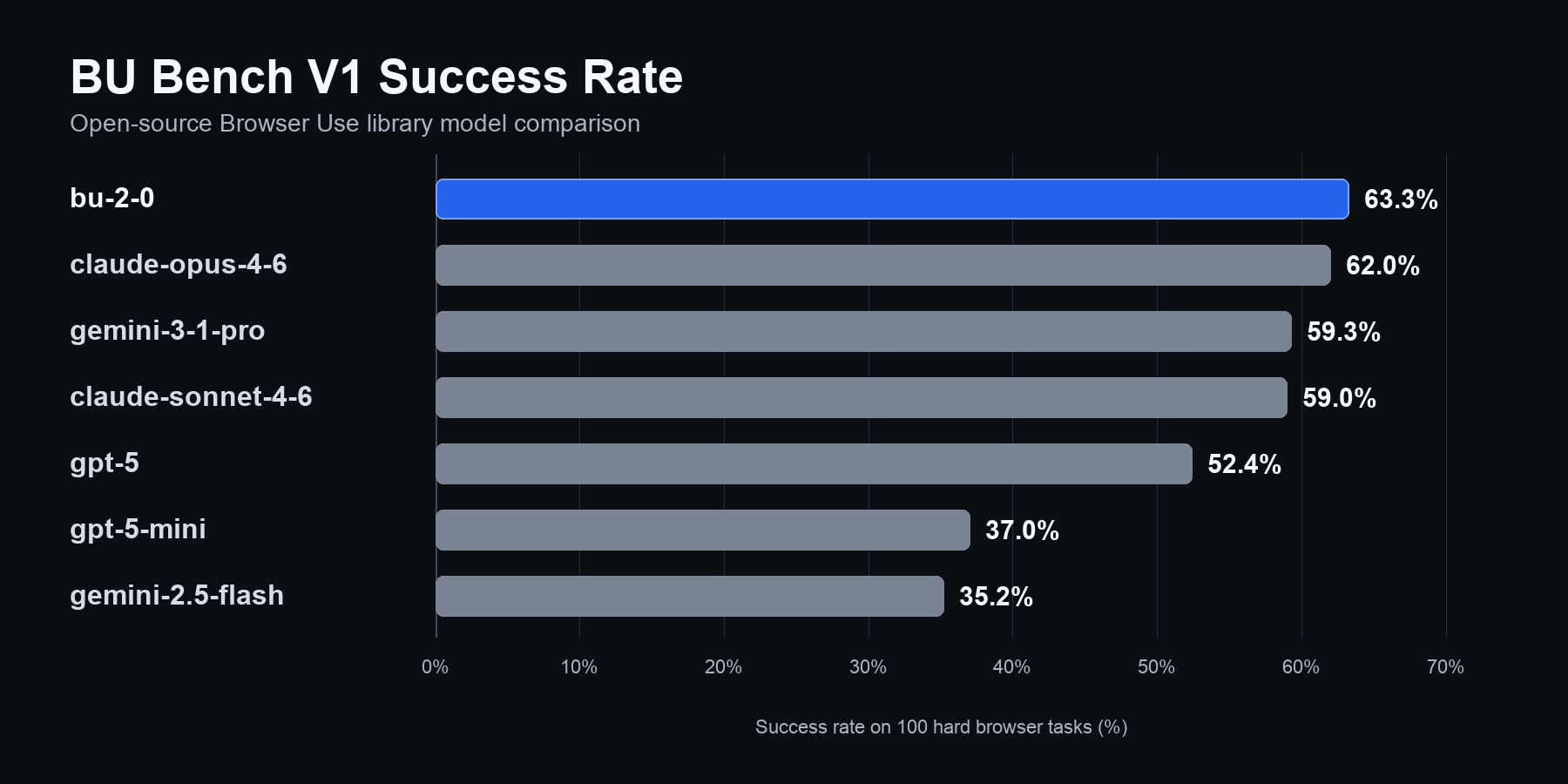
The benchmark contains 100 tasks in total.
In the public BU Bench V1 model table,
bu-2-0 is reported as OSS + BU LLM (ChatBrowserUse-2) with a 63.3% success rate when used through the open-source Browser Use library.
Judge
BU Bench V1 uses binary task success. A task is run through the browser-agent loop and then judged as complete or incomplete based on whether the final agent output satisfies the user’s intent. The judge primarily rates agent outcomes. It checks whether the requested task was fulfilled from the user’s perspective, using the final agent output and the run trace. This means failures caused by external circumstances can still count as failures. For example, if a target website is unavailable, has changed, or blocks access, the browser agent may behave correctly at the computer-control level but still fail the benchmark task because the user intent was not completed. Public judge details:- 100 tasks.
- Multiple runs per model.
- Standard error bars in the original plots.
- 200 hand-labeled traces used to estimate evaluator quality.
- 87% reported agreement with human labels, with most disagreements on partial successes and technicalities.
bu-2-0 on internal suites with thousands of tasks across many domains and websites. These evaluations are used to optimize accuracy, cost, latency, recovery behavior, task coverage, and error patterns.
Known Limitations
- This model is for browser automation and is not intended for token-heavy generation workflows, such as long code generation.
- Heavily client-rendered pages, cross-origin iframes, canvas-only interfaces, and hidden state can reduce observability and make interactions less reliable.
- Pages with thousands of interactive elements can overload the CPU in sandbox environments. This can cause screenshot or DOM capture timeouts inside the Browser Use library, leading to missing model context, timeouts, or other model-call errors.
- The model can only choose from tools made available by Browser Use or the developer. For example, if no drag-and-drop tool is available, the model may not be able to perform a drag-and-drop action reliably.
- A website can change while the model is deciding on the next action, which can lead to an incorrect action.
- High-impact tasks should use features such as domain allowlists, step limits, tool allowlists, and custom human-approval tools for irreversible actions such as purchases.
- BU Bench V1 is useful but not exhaustive. It does not cover every language, website type, authentication flow, or production constraint.
- Because the web changes constantly, measured performance can change over time.
Sources
- Browser Use library: https://github.com/browser-use/browser-use
ChatBrowserUsesource: https://github.com/browser-use/browser-use/blob/main/browser_use/llm/browser_use/chat.py- Open-source docs: https://docs.browser-use.com/open-source/introduction
- Tools docs: https://docs.browser-use.com/open-source/customize/tools/basics
- API keys: https://cloud.browser-use.com/new-api-key
- BU Bench V1 blog post: https://browser-use.com/posts/ai-browser-agent-benchmark
- WebBench: https://github.com/Halluminate/WebBench
- Mind2Web 2: https://osu-nlp-group.github.io/Mind2Web-2/
- GAIA: https://arxiv.org/abs/2311.12983
- BrowseComp: https://openai.com/index/browsecomp/