


Installation
This integration requires a Browser Use version containing
browser_use.integrations.toolsets_for_claude and an Anthropic SDK version containing anthropic.tools.browser and client.beta.messages.tool_runner. If either import is unavailable, your installed package version does not support this example. Check Anthropic’s browser-toolset release instructions for SDK availability./bin/bash. On Windows, run the example inside WSL.
uvx browser-use install installs local Chromium. You can skip it if you only use Browser Use Cloud.
Set your Anthropic API key:
Quickstart
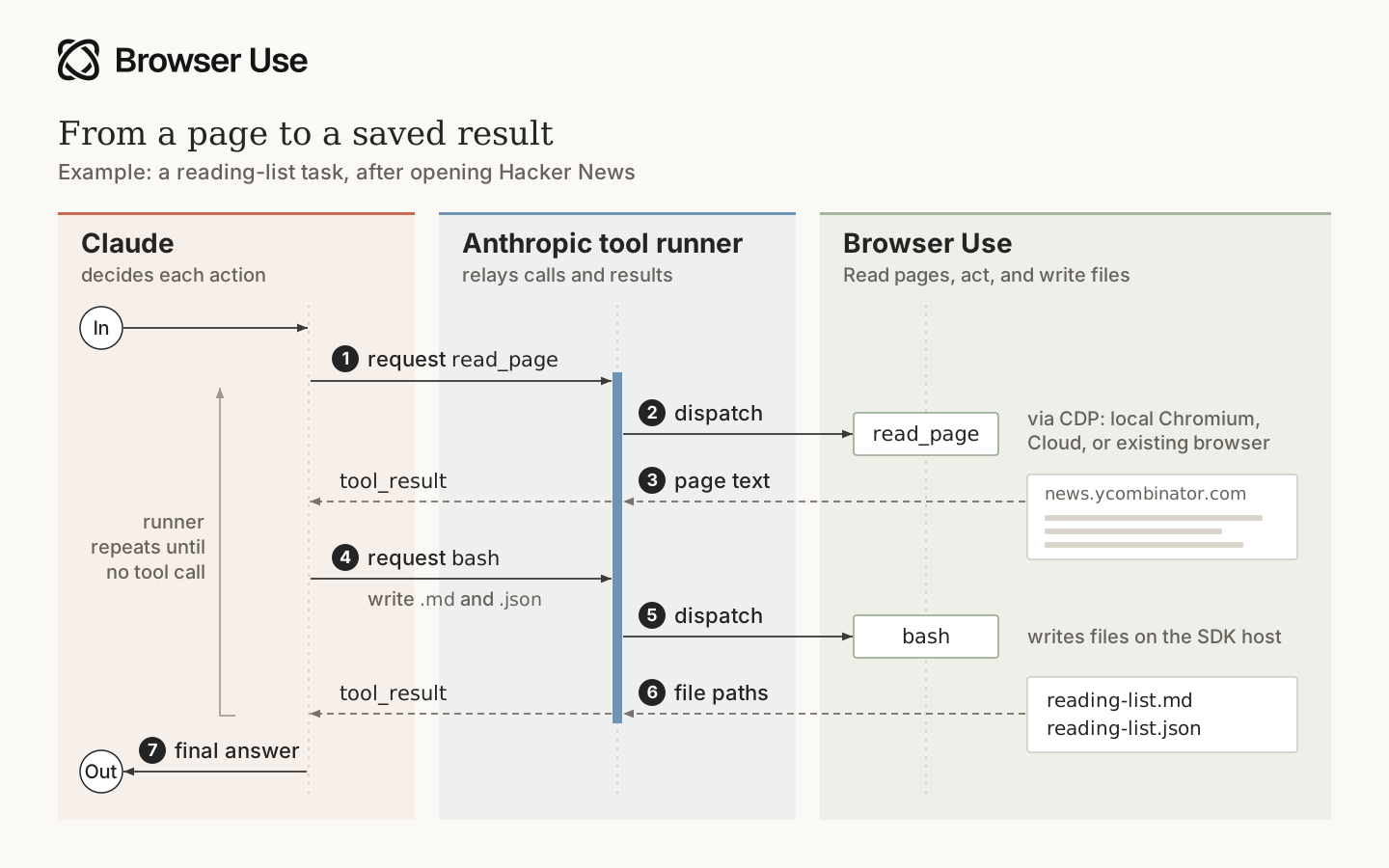
This example reads three Hacker News posts and saves their titles and URLs as Markdown and JSON inoutputs/. It enables all 31 browser actions plus Bash, without approval prompts.
Save the following as run_browser.py:
ANTHROPIC_LOG=info to include SDK request logs.
The system prompt is part of your application. Adapt it to your task.
Choose a browser
To run the browser in Browser Use Cloud, create a key at Browser Use Cloud, setBROWSER_USE_API_KEY, and uncomment use_cloud=True in the quickstart’s BrowserUse(...) call. Keep its configs and confirm arguments. For remote uploads, replace the local file_policy with the staged-document policy and resolver in Uploads to a remote browser. Local Chromium is not needed in this mode. Bash still runs on the SDK host.
BrowserUse supports three browser configurations:
To use a browser you already started, pass a connected
BrowserSession. The driver does not close a borrowed session, so close it in your application’s cleanup block. See remote browser connections for CDP configuration.
Browser tools
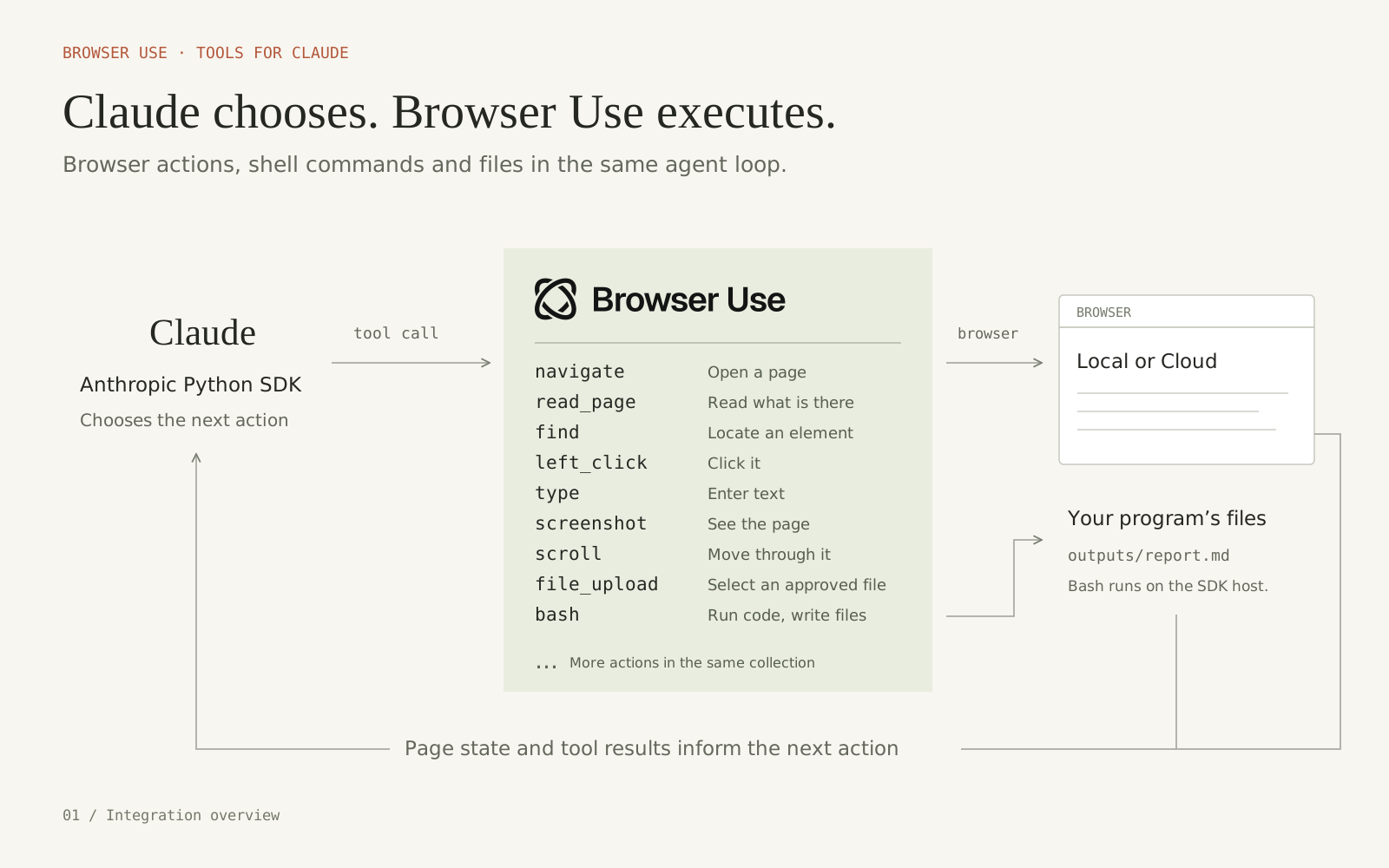
The Browser Use integration providesBrowserUse for browser actions and Bash for shell commands. Register both with tools=[driver, bash]. Leave out bash if your application should not run shell commands.
Claude calls structured actions such as navigate, read_page, and left_click, and the driver runs them over CDP. javascript_exec runs JavaScript inside the page; it is not a general-purpose CDP code interpreter. Bash runs beside your Python process with output_dir as its working directory, where it can process extracted data and write reports.

All 31 browser actions
All 31 browser actions
- Navigation:
navigate,new_tab,list_tabs,switch_tab,close_tab. - Page state:
screenshot,zoom,read_page,find,get_page_text,wait. - Pointer:
left_click,right_click,middle_click,double_click,triple_click,hover,mouse_move,left_mouse_down,left_mouse_up,left_click_drag,scroll,scroll_to. - Input:
type,key,hold_key,form_input,file_upload. - Diagnostics:
read_console,read_network,javascript_exec.
BrowserUse() follows Anthropic’s defaults: 27 actions enabled, with javascript_exec, file_upload, read_console, and read_network off. The quickstart turns those four on with configs:
tools=[driver, bash]. The SDK sends the browser toolset and its configs to Anthropic, and Claude chooses calls from the enabled actions. Disabled actions are withheld from Claude and rejected by the SDK if requested. Registering driver alone does not include Bash. javascript_exec runs JavaScript inside the page; Bash runs commands on the SDK host.
To opt out, set an action’s enabled value to False in the configs passed to BrowserUse(...). To remove Bash, use tools=[driver] and update the task and system prompt so they do not request shell commands.
File uploads and downloads
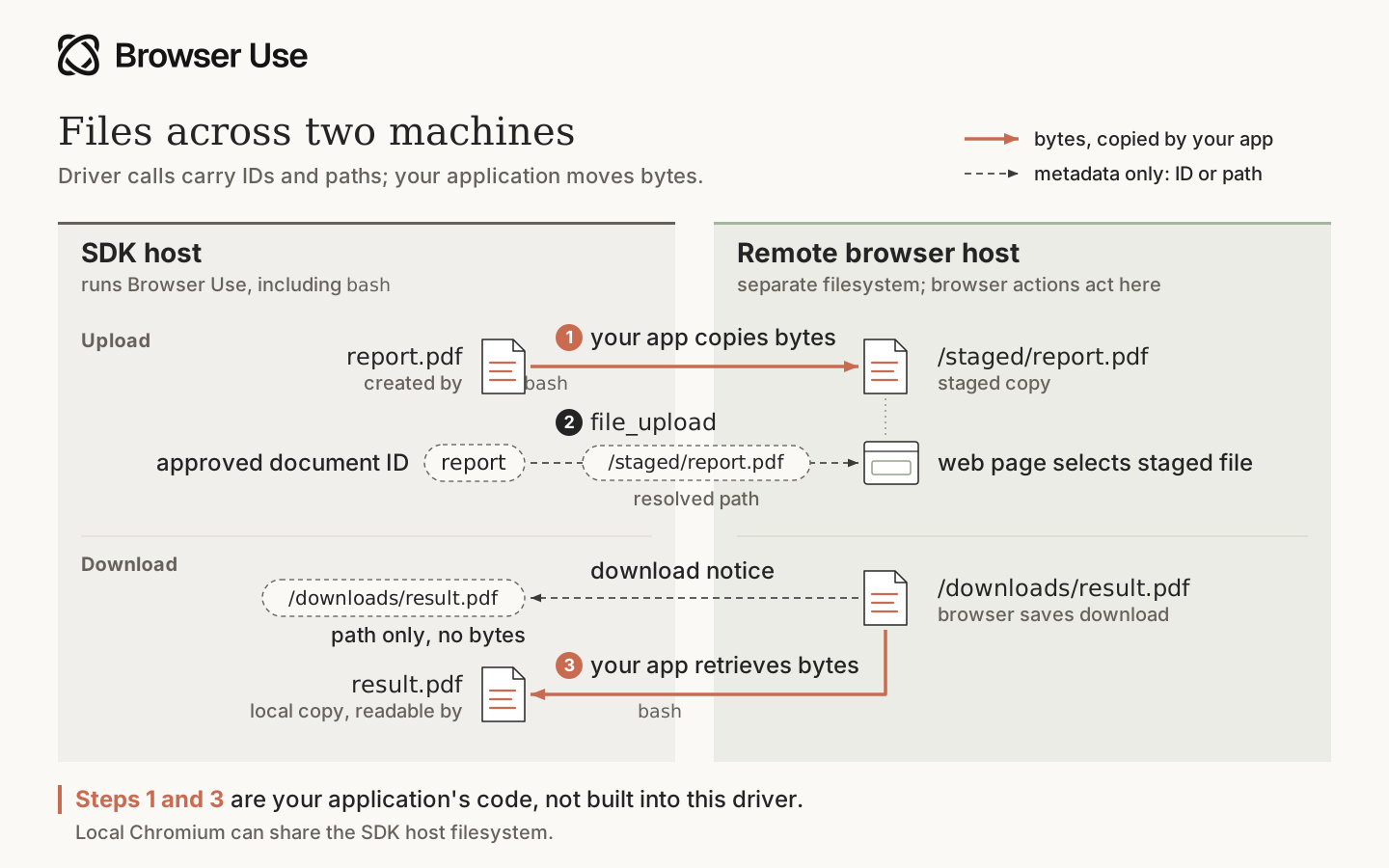
File paths in browser actions refer to the browser host. With local Chromium, that is the same machine as your Python process: an approved local file can be uploaded, and downloaded bytes can be read locally. A remote browser has its own filesystem.
Uploads to a remote browser
For a remote upload, your application must first copy the file’s bytes to the browser host. Then it can give Claude an approved document ID and map that ID to the staged path.file_upload selects the staged file in the page’s file input.
The transfer step is separate from the driver. The code below begins after report.pdf is already on the browser host:
BrowserUse(use_cloud=True) does not provide automatic upload staging or download retrieval. The open-source Agent has the same browser-host path requirement for uploads.
Downloads from a remote browser
A download notification reports that the browser finished a download. The reported path is metadata about the browser host and does not mean the file exists on the SDK host. Retrieve the file to the SDK host before asking Bash to read it. The quickstart needs no transfer, because Bash writes the Markdown and JSON directly on the SDK host.Approvals
Enablingfile_upload or javascript_exec requires a confirmation callback. The SDK calls it before executing a browser action, after checking that the action is enabled and its inputs and file selection are allowed.
The quickstart uses confirm=lambda _: True to approve browser actions automatically. Replace it with the callback below to ask for approval when Claude uploads a file or runs page JavaScript. It approves other browser actions automatically. The callback can use a terminal prompt, a review screen in your app, or your own approval service.

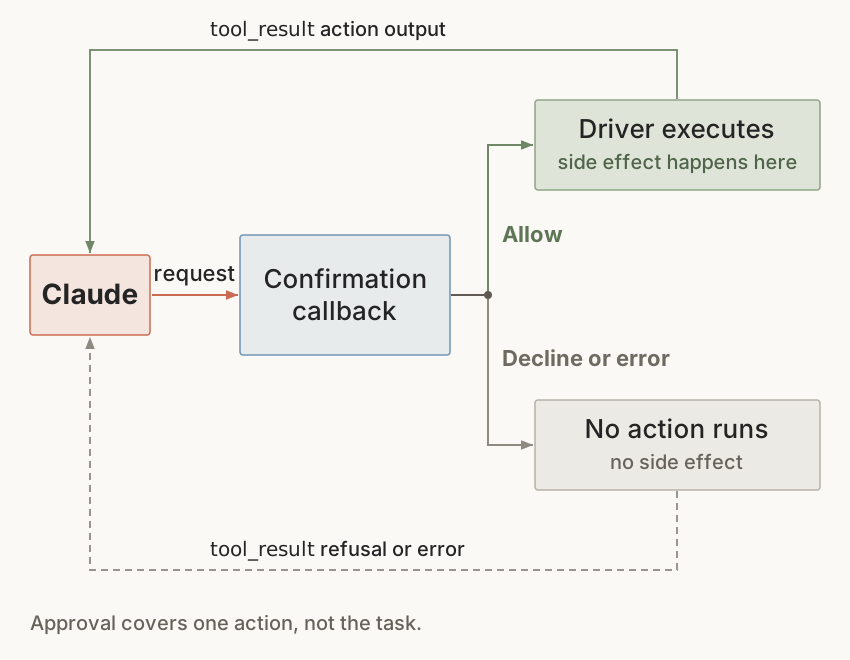
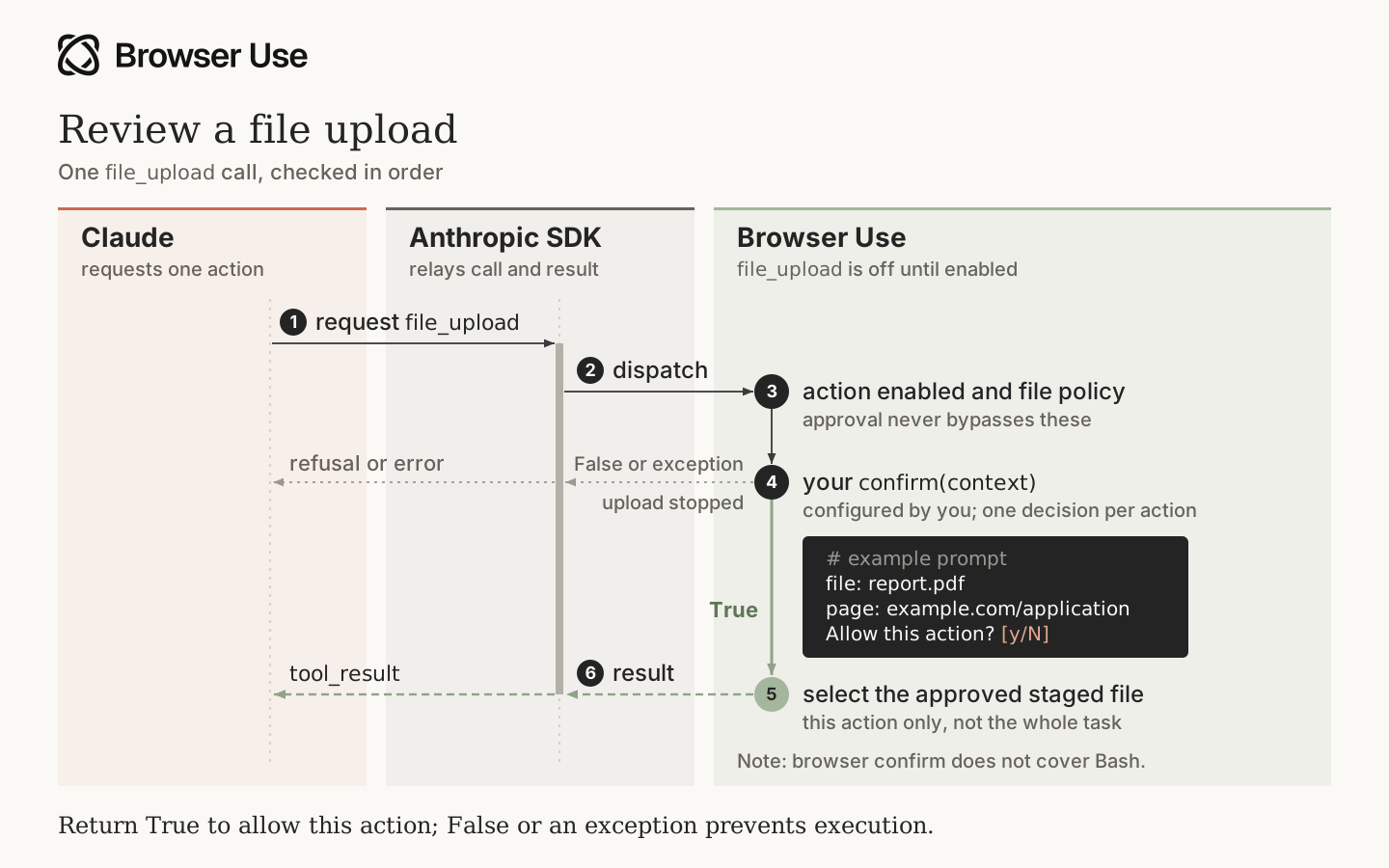
Approval applies to this action only. Later calls pass through the callback again. The file allowlist restricts local uploads to
uploads/ and outputs/, so files written by Bash can also be approved for upload. Remote browsers require staging on the browser host, as described in Uploads to a remote browser.
This callback prompts for upload and JavaScript and approves all other browser actions. Add checks for actions with side effects, such as sending a message, submitting a purchase, or deleting a record.
Browser confirmation does not cover Bash. Omit Bash or apply a separate execution policy if shell commands need approval. Bash limits execution time and returned output, and removes ambient credentials from its child environment. Its working directory is not an operating-system sandbox, so run untrusted tasks in an isolated environment.
Read the Claude browser-toolset quickstarts for the upstream SDK contract.